
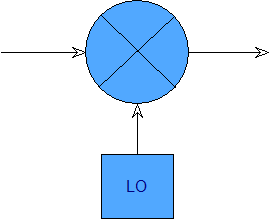
Starting with version 0.9.4, SATSAGEN can manage external mixers to extend the usable frequency range of supported devices.
Unlike the Converter RX and Converter TX parameters, which have been available in the device configuration since the early versions of the application, this new feature allows SATSAGEN to directly control the LOs of external mixers, while also giving the user detailed control over their configuration.
Configuration
In Settings, devices supporting this new feature have the EXT RX Mixer and EXT TX Mixer checkboxes in the Device Options tab.
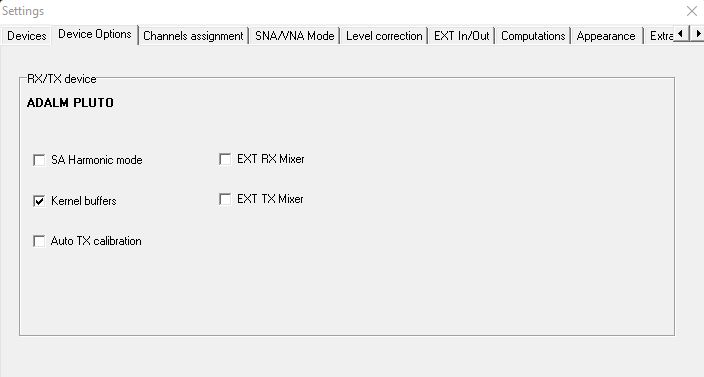
Enabling either of these options activates the corresponding functionality and makes the EXT RX Mixer and EXT TX Mixer tabs available, where the respective parameters can be configured.
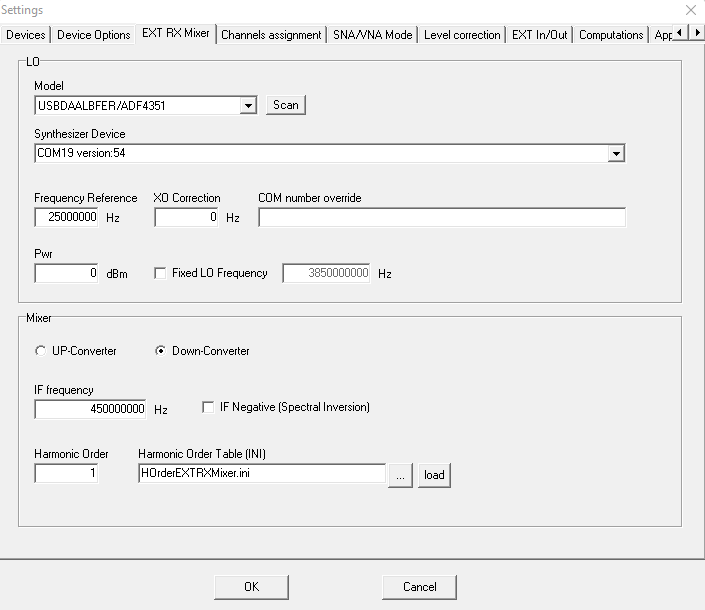
The EXT RX Mixer and EXT TX Mixer tabs are divided into two sections: LO and Mixer.
LO
The LO section is used to configure the Model, Device, reference frequency, and XO correction of the external mixer’s local oscillator.
In addition to the parameters normally available when configuring a device, it is also possible to specify the LO output level in dBm and optionally configure the local oscillator to operate at a fixed frequency.
Additionally, the LO section of the EXT TX Mixer tab includes a Shared checkbox. When selected, the EXT RX and EXT TX mixers can be configured to use a single shared LO. In this mode, the shared LO is configured exclusively in the EXT RX Mixer tab and is used by both mixers.
Mixer
The Mixer section allows the user to select which conversion product is used:
- UP-Converter: frequency addition
- Down-Converter: frequency subtraction
The same section allows the user to configure the IF frequency and select which mixing product is used relative to the LO: positive (default) or negative.
When the negative product is selected, SATSAGEN automatically performs the required Spectral Inversion to ensure that the spectrum is displayed correctly.
If a fixed LO frequency is configured in the LO section, the IF Frequency and IF Negative controls are disabled because these options are not supported in this operating mode.
Finally, the Mixer section allows the user to specify the Harmonic Order, or alternatively a lookup table defining the Harmonic Order as a function of the tuning frequency. The Harmonic Order makes it possible to operate the mixer in harmonic mode according to the characteristics of the LO and the mixer.
Operation
When Fixed LO Frequency is selected, SATSAGEN tuning controls the local oscillator of the receiving or transmitting device.
When an IF frequency is specified instead (or an RF frequency in the EXT TX Mixer tab), tuning controls the LO of the external mixer, while the local oscillator of the receiving or transmitting device remains fixed at the frequency specified by IF Frequency (or RF Frequency in the EXT TX Mixer tab).
Startup
Once the EXT Mixer configuration has been completed, SATSAGEN can be powered on.
If the configuration is valid, SATSAGEN presents its usual operating interface. The application automatically extends the frequency range of the devices for which an EXT Mixer has been enabled, according to the configured parameters.
The user can therefore specify frequencies for the Spectrum Analyzer, Spectrum Analyzer with Tracking, VNA, Generator, and Sweeper transparently, without having to manage the external mixer separately.
Only the standard harmonic-mode functions of SATSAGEN are temporarily disabled, since harmonic operation is handled more efficiently through the external mixers and may also be incompatible with their configuration.
Correction Tables
When EXT Mixers are used, the device linearization and compensation tables use the following new, dedicated type codes:
- Type 200 for RX compensation tables.
- Type 200 and Type 202 for TX linearization tables.
When receiving with an EXT RX Mixer enabled, the correction process first applies the usual Type 0 compensation according to the frequency of the RX device LO, and then adds the Type 200 compensation according to the frequency of the external mixer LO, which corresponds to the actual tuning frequency.
When transmitting with an EXT TX Mixer enabled, the linearization process first applies the usual Type 0 linearization according to the frequency of the TX device LO, and then adds the Type 200 linearization according to the frequency of the external mixer LO (the actual transmission frequency).
If the TX Multiplier is also enabled, Type 202 is used instead.
Harmonic Order Table
As mentioned above, Harmonic Order Tables allow SATSAGEN to specify the Harmonic Order to be used as a function of frequency, providing runtime management of harmonic operation when external mixers are enabled.
Harmonic Order Tables use the INI file format, with sections named HO_ followed by a sequential decimal number starting from 1.
Each section contains:
f: frequencyh: Harmonic Order
The frequencies specified in the sections must be in ascending order.
The first section must define the minimum system frequency with Harmonic Order 1, while the last section must define the maximum system frequency with the highest Harmonic Order supported.
The following is an example of a valid Harmonic Order Table:
[HO_1]
f=485000000
h=1

[HO_2]
f=4850000001
h=3

[HO_3]
f=13650000001
h=5

[HO_4]
f=22450000000
h=5
For RX operation (the same criteria can also be applied to TX, with the only difference being that IF Frequency in TX corresponds to RF Frequency), the values in the Harmonic Order Table are determined by:
- the frequency range of the external mixer’s local oscillator;
- the configured IF Frequency;
- the maximum Harmonic Order that can be reached;
- the preferred harmonic to be used at each frequency range.
Therefore, before creating a Harmonic Order Table, it is important to have a clear understanding of these parameters, which are determined by the specific characteristics of the LO and the mixer.
In the example above, the external mixer’s LO is an ADF4351, with a frequency range from 35 MHz to 4400 MHz. The mixer has an optimum IF frequency of 450 MHz and supports harmonic operation up to Harmonic Order 5.
The HO_1 section therefore defines the minimum available frequency as 485 MHz (IF + minimum ADF4351 frequency) and specifies fundamental operation (Harmonic Order 1).
The last section, HO_4, defines the maximum available frequency as 22.45 GHz, calculated as the maximum ADF4351 frequency multiplied by Harmonic Order 5 and then combined with the IF:
4400 MHz × 5 + 450 MHz = 22.45 GHz
The intermediate sections define the transition points between harmonic orders. In this example, the third harmonic is used starting at 4.85 GHz, while the fifth harmonic is used starting at 13.65 GHz.
This allows SATSAGEN to automatically select the appropriate Harmonic Order during tuning, while transparently managing the external mixer and its LO.